54,44 Incl. VAT44,99 Excl. VAT
Delivery 3-5 working days
1
Do you want to connect a laptop, PC or other device without a network connection to the internet? Then a USB to RJ45 cable is exactly what you need. More and more modern laptops, such as ultrabooks or MacBooks, no longer have an Ethernet port. A USB network cable offers the solution. With this cable you can easily connect a network cable via a USB port. You benefit from a stable, fast connection, without being dependent on wireless internet. Buying a USB to RJ45 Ethernet cable is a smart choice if you find reliability and speed important, for example for video calling, gaming or business use.
A USB to RJ45 cable is a simple solution to connect a device without an Ethernet port to a network. You connect the cable to a free USB port and connect the other end with RJ45 connection to a switch / router or modem. Especially for laptops without a built-in LAN connection, this is a handy way to use a wired internet connection. Think of situations where wifi is not stable enough, such as in the attic, in office buildings with thick walls or in networks with many users.
Even for fixed workplaces or home workplaces where reliability is paramount, internet via USB is a godsend. You are no longer dependent on the strength of the WiFi signal, but always have a direct connection to your router or modem. For those who often upload or download large files, a USB to RJ45 cable is not only handy, but actually indispensable.
With a USB network cable you can temporarily change a USB port into a network port. The cable contains a chip that converts the USB signal to an Ethernet connection. This makes your computer or laptop recognize it as if there is a real network connection. You plug in the cable and connect it to your network, and in most cases everything works immediately without further installation.
The big advantage of this solution is the reliability. Where wifi is subject to interference, speed fluctuations and range problems, a wired connection always offers maximum stability. Especially during online meetings, streaming video or while gaming, this makes a noticeable difference. Buying a USB to RJ45 cable means choosing certainty in your connection.
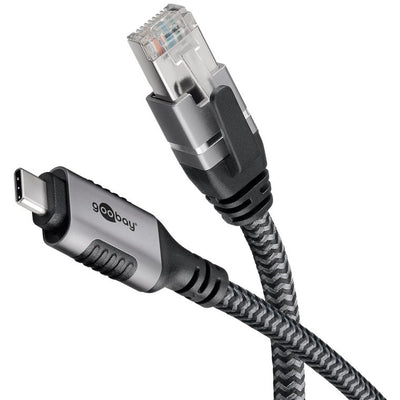
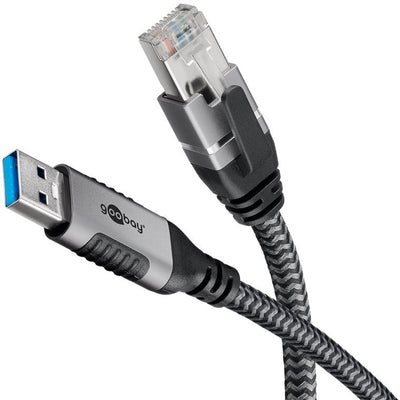
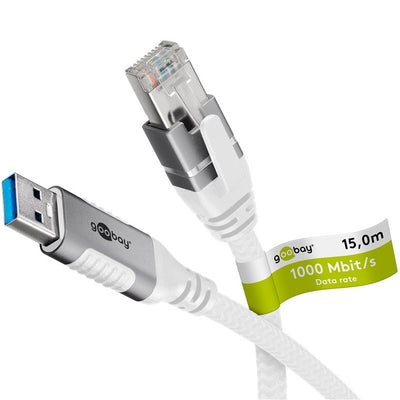
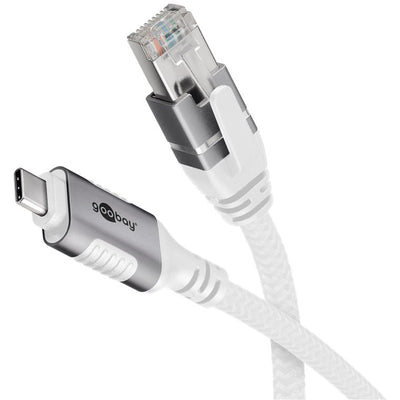
There are different types of cables available, tailored to the type of USB connection and the desired speed. For example, there are models with USB-A, the traditional connection that is on almost every PC or laptop. In addition, there are USB C versions, which you use on modern laptops, tablets and MacBooks. Always choose the type of connection that fits your device.
The speed of the cable is also important. Most models offer 100 megabit or 1 gigabit of transfer speed. For basic applications such as surfing the internet or e-mailing, 100 megabit is sufficient. However, if you want to transfer files quickly or use your network speed to the full, choose a gigabit cable.
Some USB to RJ45 models are part of a USB hub. You then have multiple connections at the same time, such as USB ports and a network connection in one. Handy if you want to connect multiple peripherals to a laptop with few connections.
When choosing the right cable, the first thing you look at is the type of USB port on your device. If you have an older laptop, USB-A is the logical choice. For MacBooks and many new laptops with only USB-C ports, you will naturally choose a USB C model.
Also pay attention to the speed that the cable supports. If you use your internet mainly for browsing and e-mail, then a simple USB Ethernet cable with 100 megabit is sufficient. For faster internet and network traffic, a cable with support for 1 gigabit is recommended.
Also check the length of the cable. For mobile use, a longer version is useful. If you mainly work in a fixed location, a shorter cable is often more convenient and also more durable. Most USB network cables are suitable for Windows and Mac. When using on a Chromebook or Linux system, it is a good idea to check whether there is support. Many cables are now plug and play, but some systems may require additional drivers.
A popular cable is the compact USB C to RJ45 cable that is suitable for MacBooks, among others. This model works without additional power and is completely plug and play. It offers gigabit speed and fits directly into any USB C port.
Also handy is the combination of a USB hub with ethernet. You not only get access to the internet via USB, but also extra USB ports for mouse, keyboard or external storage. This combination is often chosen by home workers and laptop users who use a lot of peripherals.
A frequently asked question is whether these cables also work with a USB-C connection. The answer is yes, as long as you choose the right version. There are models specifically for USB-C and models for USB-A. Choose the type that fits your laptop or device.
Another question is whether you need drivers. In most cases, the cable works immediately. With older operating systems or specific hardware, you may need to download a driver from the manufacturer. At netwerkkabel.eu, this is always stated on the product page.
In terms of speed, internet via USB is usually faster and more stable than wifi. Especially in a busy household or at the office, you will notice the difference immediately. You do not suffer from unstable connections and often achieve higher speeds than via wireless internet.
Finally, users wonder if these cables also work on a Chromebook or MacBook. Most models are suitable for this. It is important to check whether your device supports USB Ethernet and whether a driver is required. On many Chromebooks, the cable works immediately, as well as on MacBooks with macOS.
Een USB naar RJ45 kabel is een aanvoudige oplossing om een apparaat zonder ethernetpoort alsnog met een netwerk te verbinden. Je sluit de kabel aan op een vrije USB-poort en verbindt de andere uiteinde met RJ45 aansluiting aan op een switch / router of modem. Vooral bij laptops zonder ingebouwde LAN-aansluiting is dit een handige manier om gebruik te maken van een bedrade internetverbinding. Denk aan situaties waarin wifi niet stabiel genoeg is, zoals op zolder, in kantoorpanden met dikke muren of bij netwerken met veel gebruikers.
Ook bij vaste werkplekken of thuiswerkplekken waar betrouwbaarheid voorop staat, is internet via USB een uitkomst. Je bent niet meer afhankelijk van de sterkte van het wifi-signaal, maar hebt altijd een directe verbinding met je router of modem. Voor wie vaak grote bestanden uploadt of downloadt, is een USB naar RJ45 kabel niet alleen handig, maar eigenlijk onmisbaar.
Met een USB netwerkkabel verander je een USB-poort tijdelijk in een netwerkpoort. De kabel bevat een chip die het USB-signaal omzet naar een ethernetverbinding. Hierdoor herkent je computer of laptop het alsof er een echte netwerkaansluiting aanwezig is. Je plugt de kabel in, en sluit deze aan op je netwerk, en in de meeste gevallen werkt alles meteen zonder verdere installatie.
Het grote voordeel van deze oplossing is de betrouwbaarheid. Waar wifi onderhevig is aan storingen, snelheidschommelingen en bereikproblemen, biedt een bekabelde verbinding altijd de maximale stabiliteit. Zeker bij online vergaderingen, het streamen van video of tijdens het gamen maakt dat een merkbaar verschil. Een USB naar RJ45 kabel kopen betekent kiezen voor zekerheid in je verbinding.
Er zijn verschillende soorten kabels beschikbaar, afgestemd op het type USB-aansluiting en de gewenste snelheid. Zo zijn er modellen met USB-A, de traditionele aansluiting die op vrijwel elke pc of laptop zit. Daarnaast zijn er USB C uitvoeringen, die je gebruikt op moderne laptops, tablets en MacBooks. Kies altijd het type aansluiting dat past bij je apparaat.
Ook de snelheid van de kabel is belangrijk. De meeste modellen bieden 100 megabit of 1 gigabit aan overdrachtssnelheid. Voor basistoepassingen zoals internetten of e-mailen is 100 megabit voldoende. Wil je echter snel bestanden overzetten of je netwerksnelheid volledig benutten, kies dan voor een gigabit kabel.
Sommige USB naar RJ45 modellen zijn onderdeel van een USB hub. Je hebt dan meerdere aansluitingen tegelijk, zoals USB poorten en een netwerkaansluiting in één. Handig als je meerdere randapparaten wilt verbinden op een laptop met weinig aansluitingen.
Bij het kiezen van de juiste kabel kijk je als eerste naar het type USB-aansluiting van je apparaat. Heb je een oudere laptop, dan is USB-A de logische keuze. Voor MacBooks en veel nieuwe laptops met alleen USB-C poorten kies je vanzelfsprekend voor een USB C model.
Let daarnaast op de snelheid die de kabel ondersteunt. Gebruik je je internet vooral voor browsen en e-mail, dan is een eenvoudige USB Ethernet kabel met 100 megabit voldoende. Voor sneller internet en netwerkverkeer is een kabel met ondersteuning voor 1 gigabit aan te raden.
Bekijk ook de lengte van de kabel. Voor mobiel gebruik is een langere uitvoering handig. Werk je vooral op een vaste plek, dan is een kortere kabel vaak iets handiger en ook duurzamer. De meeste USB netwerkkabels zijn geschikt voor Windows en Mac. Bij gebruik op een Chromebook of Linux-systeem is het goed om even te checken of er ondersteuning is. Veel kabels zijn tegenwoordig plug and play, maar bij sommige systemen kunnen extra drivers nodig zijn.
Een veelgekozen kabel is de compacte USB C naar RJ45 kabel die geschikt is voor o.a. MacBooks. Dit model werkt zonder extra voeding en is volledig plug and play. Het biedt gigabit snelheid en past direct in elke USB C poort.
Ook handig is de combinatie van een USB hub met ethernet. Je krijgt dan niet alleen toegang tot internet via USB, maar ook extra USB poorten voor muis, toetsenbord of externe opslag. Deze combinatie wordt vaak gekozen door thuiswerkers en laptopgebruikers die veel randapparatuur gebruiken.
Een veelgestelde vraag is of deze kabels ook werken met een USB-C aansluiting. Het antwoord is ja, zolang je de juiste uitvoering kiest. Er zijn modellen speciaal voor USB-C en modellen voor USB-A. Kies het type dat past bij jouw laptop of apparaat.
Een andere vraag is of je drivers nodig hebt. In de meeste gevallen werkt de kabel direct. Bij oudere besturingssystemen of specifieke hardware kan het zijn dat je even een driver moet downloaden van de fabrikant. Bij netwerkkabel.eu staat dit altijd vermeld op de productpagina.
Wat betreft snelheid is internet via USB meestal sneller en stabieler dan wifi. Zeker bij een druk huishouden of op kantoor merk je het verschil meteen. Je hebt geen last van instabiele verbindingen en haalt vaak hogere snelheden dan via draadloos internet.
Tot slot vragen gebruikers zich af of deze kabels ook werken op een Chromebook of MacBook. De meeste modellen zijn hier gewoon geschikt voor. Wel is het belangrijk om te controleren of jouw apparaat USB Ethernet ondersteunt en of er eventueel een driver nodig is. Op veel Chromebooks werkt de kabel direct, net als op MacBooks met macOS.