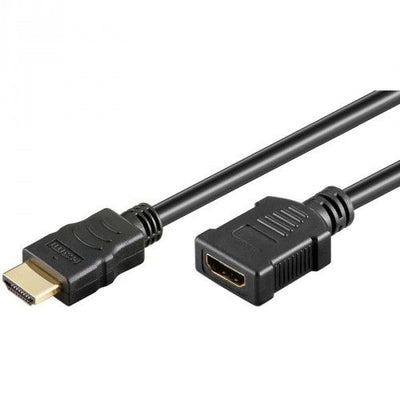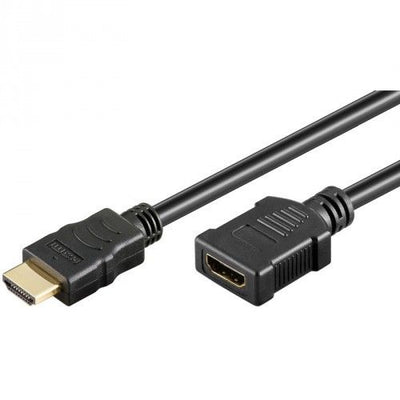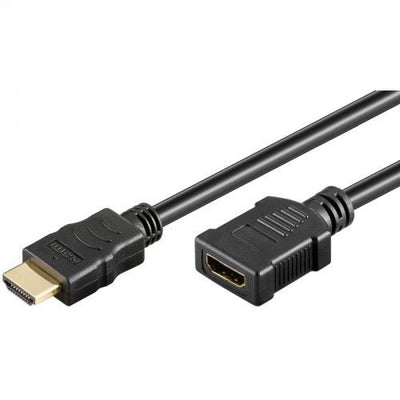
High Speed HDMI Extension cable with ethernet 3 meters
Delivered tomorrow
18,25 Incl. VAT15,08 Excl. VAT
Delivered tomorrow
1
Do you have an HDMI cable that is just too short to properly connect your TV, projector or game console? Then HDMI extension cables offer the ideal solution. Without loss of image quality and without having to purchase a completely new cable, you can easily extend the existing connection. Whether it concerns a fixed installation in the wall, a projector on the ceiling or a television that you want to move a bit, with the right extension cable your image remains razor-sharp and your installation neat.
An HDMI extension cable is a handy solution when your existing HDMI cable is just too short. You use this cable between your device and the existing connection, so that you do not have to pull a new cable or convert everything. This is useful if, for example, you hang your television on a bracket and place it a little further away from the connection, or if you temporarily place your game console somewhere else. An extension cable also offers flexibility in meeting rooms or with projector installations without compromising image or sound.
Extending is very simple. You connect the extension cable to your existing HDMI cable and connect the other end to your device. This creates one longer HDMI connection. Please note that you do not make an unnecessarily long combination, because with HDMI the total length is important for the quality of the signal.
There are two types of HDMI extension cables: passive and active. A passive extension cable extends the existing signal without any additional electronics. This works well for shorter distances, for example up to five meters. For those who need more length, an active HDMI extension cable is a better choice. This cable contains a small amplifier that actively forwards the signal, so you can count on a stable connection even over longer distances.
When your image or sound starts to stutter, it is often a sign that the signal is weakening. In that case, an active HDMI cable can be the solution. Especially with 4K or higher resolutions, it is wise to look at an amplified variant from seven to ten meters. This prevents interference and loss of quality.
The right HDMI extension cable also depends on the equipment you use. For a television or projector with Full HD, a cable with HDMI version 1.4 is usually sufficient. If you watch content in 4K, for example via an Apple TV, a PlayStation or a modern media box, then you need an extension cable that supports HDMI 2.0. If you work with 4K at high refresh rates or even with 8K, then HDMI 2.1 is the right choice.
It is important that the extension cable supports the same version as your existing HDMI cable and devices. Otherwise you will lose certain functions such as HDR, ARC or 4K at sixty hertz. So always check what your equipment can handle and adjust your extension cable to that.
Sometimes an HDMI extension cable is the fastest solution, but in other cases an HDMI repeater or a coupler can work better. An HDMI repeater is a small device that amplifies the signal between two cables. This can be useful if, for example, you already have two HDMI cables that you want to combine into one longer connection.
An HDMI coupler works as a simple connector between two cables. This is especially useful if you only need a small extra piece. Keep in mind that using a coupler increases the chance of signal loss, especially if you combine two longer cables. In that case, a reinforced HDMI extension cable offers a more reliable solution.
With HDMI cables, the length plays a major role in signal quality. Up to about five meters, you can use a standard passive cable without any problems. If you go further than seven meters, you run the risk of the signal becoming weaker. With Full HD, this can often still be absorbed, but with 4K or higher, it is wise to switch to a reinforced HDMI extension cable or even a fiber optic HDMI solution.
For fixed installations, for example if you are concealing cables in the wall or ceiling, it is smart to choose a cable that is long enough and offers the right support. This prevents later adjustments or quality problems when using higher resolutions.
When purchasing HDMI extension cables, pay attention to the quality of the connectors and the finish of the cable. Cables with gold-plated contacts ensure a good connection and are less susceptible to wear. A sturdy shielding prevents interference, especially if there are other cables nearby. Always choose a length that suits your setup. A cable that is too long is inconvenient to hide, while a cable that is too short still causes tension on the connection.
Also compare the price-quality ratio. At netwerkkabel.eu you will find both affordable standard cables and premium versions with extra shielding or flexible sheathing. This way you can easily choose a cable that suits your situation and your equipment.
Many people wonder if HDMI extension cables work with 4K or even 8K. They certainly can, provided you choose a cable that supports HDMI 2.0 or 2.1 and is not too long without amplification. The difference between an extender and a coupler is in the design. An extender is a cable with a male connector on one side and a female connector on the other. A coupler is a separate piece that you can use to connect two standard cables together.
Want to know if you need an active extension cable? Then pay attention to the total number of meters and the resolution of your equipment. For high resolutions and longer distances, amplification is often necessary. And yes, you can combine an existing cable with an extender, as long as both cables are of good quality and have the right specifications.
Een HDMI verlengkabel is een handige oplossing wanneer je bestaande HDMI kabel net te kort is. Je gebruikt deze kabel tussen je apparaat en de bestaande aansluiting, zodat je geen nieuwe kabel hoeft te trekken of alles hoeft om te bouwen. Dit komt goed van pas als je bijvoorbeeld je televisie aan een beugel hangt en iets verder van de aansluiting plaatst, of wanneer je je spelcomputer tijdelijk ergens anders neerzet. Ook in vergaderruimtes of bij beamerinstallaties biedt een verlengkabel flexibiliteit zonder concessies aan beeld of geluid.
Het verlengen werkt heel eenvoudig. Je sluit de verlengkabel aan op je bestaande HDMI kabel en verbindt het andere uiteinde met je apparaat. Zo ontstaat er één langere HDMI verbinding. Let er wel op dat je geen onnodig lange combinatie maakt, want bij HDMI is de totale lengte belangrijk voor de kwaliteit van het signaal.
Er zijn twee soorten HDMI verlengkabels: passieve en actieve. Een passieve verlengkabel verlengt het bestaande signaal zonder extra elektronica. Deze werkt prima voor kortere afstanden, bijvoorbeeld tot vijf meter. Voor wie meer lengte nodig heeft, is een actieve HDMI verlengkabel een betere keuze. Deze kabel bevat een kleine versterker die het signaal actief doorstuurt, waardoor je ook bij grotere afstanden kunt rekenen op een stabiele verbinding.
Wanneer je beeld of geluid begint te haperen, is dat vaak een teken dat het signaal verzwakt. In dat geval kan een actieve HDMI kabel de oplossing zijn. Zeker bij 4K of hogere resoluties is het verstandig om al vanaf zeven tot tien meter naar een versterkte variant te kijken. Zo voorkom je storing en verlies van kwaliteit.
De juiste HDMI verlengkabel hangt ook af van de apparatuur die je gebruikt. Voor een televisie of beamer met Full HD is een kabel met HDMI versie 1.4 meestal voldoende. Kijk je content in 4K, bijvoorbeeld via een Apple TV, een PlayStation of een moderne mediabox, dan heb je een verlengkabel nodig die HDMI 2.0 ondersteunt. Werk je met 4K op hoge verversingssnelheden of zelfs met 8K, dan is HDMI 2.1 de juiste keuze.
Het is belangrijk dat de verlengkabel dezelfde versie ondersteunt als je bestaande HDMI kabel en apparaten. Anders verlies je bepaalde functies zoals HDR, ARC of 4K op zestig hertz. Controleer dus altijd wat je apparatuur aankan en stem daar je verlengkabel op af.
Soms is een HDMI verlengkabel de snelste oplossing, maar in andere gevallen kan een HDMI repeater of een koppelstuk beter werken. Een HDMI repeater is een klein apparaatje dat het signaal versterkt tussen twee kabels. Dit kan handig zijn als je bijvoorbeeld al twee HDMI kabels hebt die je wilt combineren tot één langere verbinding.
Een koppelstuk HDMI werkt als een simpele tussenverbinder tussen twee kabels. Dit is vooral handig als je maar een klein stukje extra nodig hebt. Houd er wel rekening mee dat bij gebruik van een koppelstuk de kans op signaalverlies groter wordt, zeker als je twee langere kabels combineert. In dat geval biedt een versterkte HDMI verlengkabel een betrouwbaardere oplossing.
Bij HDMI kabels speelt de lengte een grote rol in de signaalkwaliteit. Tot ongeveer vijf meter kun je zonder problemen een standaard passieve kabel gebruiken. Ga je verder dan zeven meter, dan loop je het risico dat het signaal zwakker wordt. Bij Full HD is dat vaak nog wel op te vangen, maar bij 4K of hoger is het verstandig om over te stappen op een versterkte HDMI verlengkabel of zelfs een glasvezel HDMI oplossing.
Voor vaste installaties, bijvoorbeeld als je kabels wegwerkt in de muur of plafond, is het slim om gelijk te kiezen voor een kabel die lang genoeg is en de juiste ondersteuning biedt. Zo voorkom je latere aanpassingen of kwaliteitsproblemen bij gebruik van hogere resoluties.
Let bij de aanschaf van HDMI verlengkabels op de kwaliteit van de connectoren en de afwerking van de kabel. Kabels met vergulde contacten zorgen voor een goede verbinding en zijn minder gevoelig voor slijtage. Een stevige afscherming voorkomt storingen, zeker als er ook andere kabels in de buurt liggen. Kies altijd een lengte die past bij jouw opstelling. Een te lange kabel is onhandig om weg te werken, terwijl een te korte kabel alsnog voor trek op de aansluiting zorgt.
Vergelijk ook de prijs-kwaliteitverhouding. Bij netwerkkabel.eu vind je zowel voordelige standaardkabels als premium uitvoeringen met extra afscherming of flexibele mantel. Zo kies je eenvoudig een kabel die past bij jouw situatie én bij je apparatuur.
Veel mensen vragen zich af of HDMI verlengkabels werken met 4K of zelfs 8K. Dat kan zeker, mits je kiest voor een kabel die HDMI 2.0 of 2.1 ondersteunt en niet te lang is zonder versterking. Het verschil tussen een verlenger en een koppelstuk zit in de uitvoering. Een verlenger is een kabel met aan één kant een mannelijke en aan de andere kant een vrouwelijke aansluiting. Een koppelstuk is een los tussenstukje waarmee je twee standaardkabels aan elkaar koppelt.
Wil je weten of je een actieve verlengkabel nodig hebt? Let dan op het totale aantal meters en de resolutie van je apparatuur. Bij hoge resoluties en langere afstanden is versterking vaak noodzakelijk. En ja, je kunt een bestaande kabel combineren met een verlenger, zolang beide kabels van goede kwaliteit zijn en de juiste specificaties hebben.